Blackout
Switch off a broken MacBook screen. Keep the lid open.
macOS 14+ · Apple silicon & Intel · MIT licensed · Free
Switch off a broken MacBook screen. Keep the lid open.
macOS 14+ · Apple silicon & Intel · MIT licensed · Free
The laptop was otherwise perfect. The screen was not.
So I docked it to an external monitor and got on with my life. This worked, except for two problems that turned out to be in direct conflict with each other.
macOS cheerfully detects the shattered panel as a perfectly good second display. Windows wander off into it. The cursor vanishes into a region of spacetime made entirely of cracks. You drag things back by feel.
Clamshell mode fixes all of the above and the machine runs hotter. The aluminium lid and the keyboard deck are a big part of how it sheds heat passively, and shutting the two together traps it. Fans ramp earlier and stay there. In a heatwave, you can hear it from the next room.
BetterDisplay and Lunar both solve this behind a paid toggle. I wanted to know how it actually worked. It turns out to be about two hundred lines.
Two things, the moment you flip the switch.
The built-in display is mirrored onto your external monitor, so it stops being its own desktop space. Nothing can be dragged onto it. The cursor can't escape into it.
Brightness goes to nothing, so the panel isn't quietly burning backlight behind a picture nobody will ever look at.
The screen is still physically there, still powered, still broken. It just stops being somewhere your windows can go. Lid stays open, the chassis keeps radiating, the fans stay quiet.
Most of these are the kind that otherwise leave you staring at a black rectangle, wondering how to get your desktop back.
Download the DMG, drag Blackout to Applications, then run this — it is not optional.
xattr -dr com.apple.quarantine /Applications/Blackout.app
The app is ad-hoc signed and not notarized, because notarization needs a paid Apple Developer account and this is a thing I built for one laptop. Without that command Gatekeeper will tell you the app is damaged. It isn't — it's just unsigned by anyone Apple recognises.
If you'd rather not run a command you don't trust against a binary you didn't build, then don't. Build it yourself instead:
git clone https://github.com/zcuric/blackout.git
cd blackout
xcodebuild -project Blackout.xcodeproj -scheme Blackout -configuration Release build
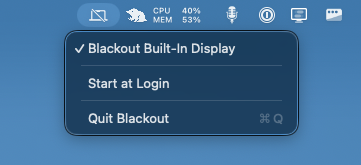
Or just open Blackout.xcodeproj and hit ⌘R. There's no window
and no Dock icon — look for the laptop in your menu bar. It gains a slash when blackout is on.
Already running BetterDisplay or Lunar? Quit them first. All of us are fighting over the same mirror and brightness state, and we all re-assert it on every display change. It goes about as well as you'd expect.
There is a "proper" way to do this — the true clamshell disconnect, where the display vanishes
from the display list entirely, exactly as if you'd closed the lid. It lives in
SLSDisplayPowerControlClient inside the private SkyLight.framework, and it
needs the entitlement com.apple.private.SkyLight.displaypowercontrol.
You cannot get that entitlement. Not with a developer account, not by self-signing, not with SIP disabled. It is Apple-internal, full stop. I went down that road so you don't have to. Mirror and dim gets you the same practical result.
The bug that took real hardware to find: enumerate displays with
CGGetOnlineDisplayList, not CGGetActiveDisplayList. A
display that is mirroring another drops out of the active list entirely — so the instant blackout was
applied, the built-in panel vanished from the only list the app was looking at, and the code to turn
blackout back off began with "find the built-in panel". A one-way trip into a dark screen.
Also: CGDisplayIsBuiltin returns boolean_t, a UInt32, not a
Swift Bool. Compare against zero.
Because it calls into a private Apple framework, Blackout can't be sandboxed and will never see the inside of the App Store. It's ad-hoc signed and built for exactly one Mac: mine. It'll work on yours at your own risk — admittedly low, given the worst case is "log out and back in".