
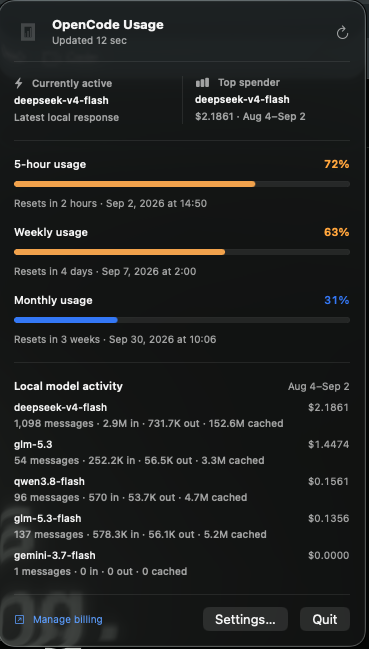
A glance instead of another dashboard.
OpenUsage keeps the three numbers that matter—five-hour, weekly, and monthly usage—next to the work itself. Reset times come directly from OpenCode and appear in both relative and local time.
The details stay honest.
Remote quota percentages are authoritative. “Currently active,” “Top spender,” and the model rows come from local OpenCode history. They are labeled separately because a local database cannot account for work done on another Mac—and the public API does not expose the website’s private per-model quota table.
Useful context is better than invented precision.
Warnings before the wall.
Enable alerts at 50%, 75%, or 90% independently. OpenUsage checks each quota window and sends each threshold once per reset cycle. No alert storm, and no background telemetry.
Install it.
Download the current DMG, drag OpenUsage into Applications, and launch it. This independent release is not notarized, so Gatekeeper may need one explicit command:
xattr -dr com.apple.quarantine /Applications/OpenUsage.appOpenUsage automatically uses an existing local opencode-go credential. If the CLI is not signed in, Settings accepts a fallback API key stored in macOS Keychain. Need a subscription? Get OpenCode Go1.
Small permissions, clear boundaries.
There is no account service, analytics SDK, advertising code, or remote database. Your credential goes only to OpenCode’s HTTPS usage endpoint. Local model history stays local. Read the privacy notes, architecture, or full user guide.
Built in the open.
OpenUsage is MIT licensed and independent from OpenCode. Issues and focused pull requests are welcome. If it saves you a few dashboard trips, you can buy me a coffee.